The KV8 App file size is just 6.80 MB, and you can download it here
Download KV8 App 📱 https://www.kv8.vip/download/kv/kv.apk
The KV8 App file size is just 6.80 MB, and you can download it here
Download KV8 App 📱 https://www.kv8.vip/download/kv/kv.apk
KV8’s App is compatible with at least Android 5 or you can play with Google browser as well.
Follow these steps to clear the cache and app data:
Step 1: Open the “Settings” menu.
Step 2: Scroll down and tap on “Apps.”
Step 3: Choose “Manage Apps” and select the KV8 app.
Step 4: Tap “Clear Data” and then “Clear Cache.”
Please note that our application is not allowed to be used on 2 devices at the same time.
For the best experience playing Cricket, use Chrome on Android or Safari on iPhone. If you’re on an Android device, you can also try downloading the app.
https://www.kv8.vip/download/kv/kv.apk
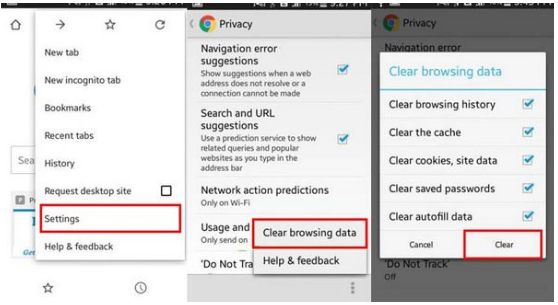
We are suggesting you reinstall the browser by deleting the app from your mobile and installing it again. You may clear the mobile browser cache as well.
How do I clear the browser cache?
Can try with backup domain links which were given in the Live Chat too?
Please note that our app is not available on Google Play yet. Though, you can download it directly from the link below.
🔗https://kv8.vip/bd/en/app-download
Yes, it’s completely free! There are no installation or sign-up fees.
Yes, you can place bets using your mobile browser or download our app to bet on the go!
Download KV8 APP Now: 📱 https://www.kv8.vip/download/kv/kv.apk